Free Rent Tracker Excel Template for Landlords (2026)
The easiest way to track rent is a spreadsheet that lists each property and tenant in rows and the months in columns. You enter the rent you collect each month, and a rent tracker Excel template color-codes paid, partial, and late payments for you. Download the free template below and start in about five minutes.
⬇ Download the free rent tracker template (Excel)
How to track rent payments in Excel
Excel is the most common tool landlords use to track rent. With rows, columns, and a few formulas it can hold everything from tenant records to a full income-and-expense log. Once you pass a couple of units, though, rent tracking turns into real data you need to manage, and a ready-made rental property spreadsheet saves hours.
Here’s the basic setup:
- Create a tab for your properties (or keep them all in one tracking sheet).
- Add property and tenant details at the top: address, tenant name, lease dates, and deposit.
- Put the months across the columns.
- In each row, record the rent due, the amount collected, the payment date, and any notes.
- Use conditional formatting to color each cell by payment status automatically.
That’s all it takes to turn a blank sheet into a working rent ledger.
Download the free template
The template below lets you manage your properties and tenants right away. Download the rent tracker Excel file to your computer, or upload it to your own Google Drive to use it anywhere. You now have a ready-made rent payment tracker: just fill in the fields and start.
⬇ Download the template — 6 tabs, auto-calculated
Inside the file you’ll find:
- Properties and Tenants tabs (lease dates, rent due day, deposit, guarantor)
- Rent Tracking: type the amount you collect each month and the cell colors itself
- an Income-Expenses log and a Summary tab that totals every number for you
Tracking partial payments, late rent, and deposits
In the rent tracking tab, conditional formatting handles the status for you: the cell turns green when rent is paid in full, yellow for a partial payment, and red when nothing comes in. So the spreadsheet flags late rent automatically. If you also want push reminders, take a look at the free rent tracking app RentMind. Deposits and other move-in terms sit at the top of the Tenants tab, ready for each tenant.
Getting ready for tax time (Schedule E)
If you keep the income-and-expense tab updated, tax season gets far easier. In the U.S., landlords report rental income and expenses on Schedule E (Form 1040), filed with your return (generally by April 15). All you have to do is total the rent collected per property at year-end and categorize each expense: repairs, maintenance, insurance, mortgage interest, and property taxes.
One tip that saves money: don’t lump capital improvements in with repairs. Repairs are deductible the year you pay for them, while improvements (a new roof, a remodel) must be depreciated over time. When your spreadsheet separates income from expenses by category from day one, sorting this out at tax time takes minutes instead of hours. This isn’t tax advice; check IRS Topic 414 or your tax professional for your own situation.
Adapting the template to your own setup
Three ten-minute tweaks make the template fit your portfolio. Mark each property’s lease renewal month at the top of its sheet, so rent-increase conversations get a built-in reminder instead of a surprise. Add a payment channel column if you collect by a mix of cash, transfer and standing order. When a payment is disputed, the column says which record to check before the conversation starts. And build a yearly summary sheet that pulls each property’s totals into one view; at tax time that single sheet replaces an afternoon of scrolling. If your portfolio is growing, the guide to tracking rent in Excel covers sheet layout and color rules in more depth. A growing portfolio also changes what “tracking” means. Beyond payments, renewal dates and deposit conditions start to matter as much as the monthly tick. The printable rent ledger covers that layer on paper, and the rent tracking guide explains the method behind the columns.
Where Excel falls short
Excel is a battle-tested tool, and it works perfectly well as a rent payment tracker. Still, as your rent tracking grows with the years and with more tenants and properties, it starts to need real database management. At that point, instead of downloading another spreadsheet, you can switch to a free mobile app.
| Feature | Excel Template | Rent Tracking App |
|---|---|---|
| Setup | 5 minutes with a template | Download, create account |
| Automatic reminders | No | Yes (push notifications) |
| Access from any device | Manual file copies | Automatic sync |
| Many properties | Gets messy | Scales easily |
| Backups | On you | Automatic cloud |
| Cost | Free | Free (RentMind) |
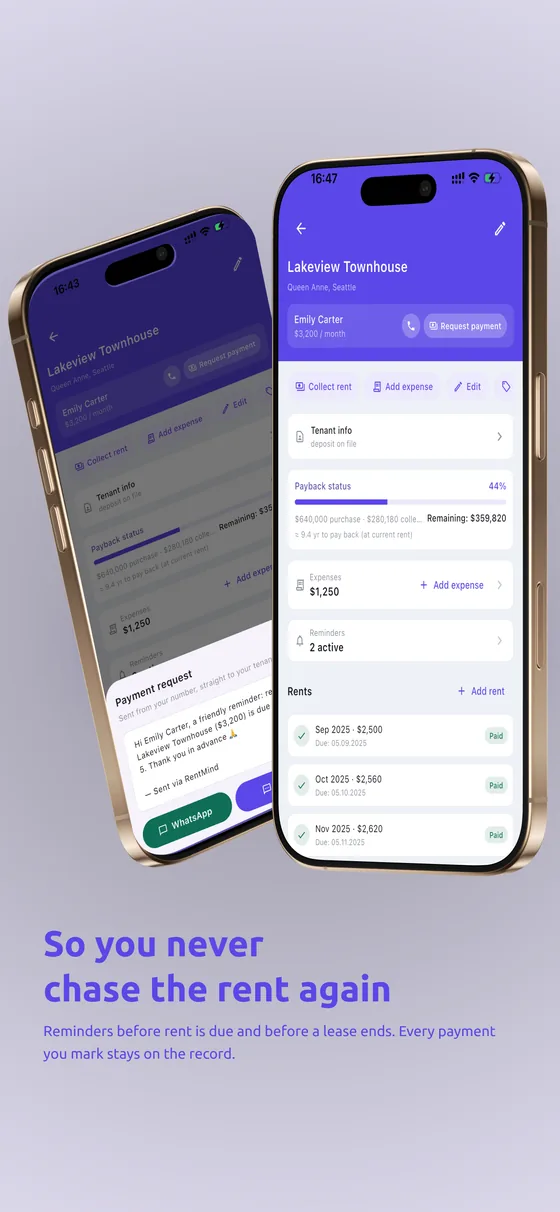
With a clean interface, tracking finally gets easy: things a spreadsheet can’t do: push reminders, large data storage, managing hundreds of units, and reviewing archived tenancies. You decide when the reminders fire, and that’s when you realize how simple rent tracking can actually be.
RentMind is free, with language and currency options and a built-in lease builder. If you have a question, you can reach support directly from the in-app Settings.
For the one calculation the sheet does not do, the rent increase calculator works out a renewal figure from the current rent and the rate.
Frequently Asked Questions
How do I track rent payments in Excel?
Open a sheet, put the months across the columns and, in each row, enter the monthly rent, the payment date, and the amount collected. Use conditional formatting to color paid and late rent. A ready-made template skips this setup so you can start filling it in right away.
Where can I download a free rent tracker template?
You can download the template on this page to your computer, or copy it into your own Google Drive. It’s completely free.
Is Excel good for landlords?
For a handful of units, yes — a spreadsheet is a fine rent ledger. As tenant count grows, switching between tabs, missing reminders, and manual-entry errors make it harder to manage.
How do I record a partial rent payment?
Add a conditional formatting rule that compares the amount collected to the rent due; when a payment comes up short, the cell automatically turns a different color. The template you download already includes this rule.
How many properties can I track in a spreadsheet?
Realistically, a few properties and tenants stay easy to manage. Beyond that, a dedicated app with reminders and multi-device access takes far less effort.
Should I use a rent tracking app instead of Excel?
If you have a few units, Excel is enough. But if you want reminders, access from any device, and room for many properties, a free app like RentMind saves you the busywork.
Fuat Çakır — management consultant and the developer of RentMind. He has been hands-on with real estate and rent management since 2014.